Last updated: November 2nd 2026
You can reduce load on JFrog Artifactory without adding nodes by putting a caching proxy in front of it. The proxy serves repeat requests for the same artifacts from cache, so Artifactory only handles cache misses and checks on changing metadata. Varnish Virtual Registry (formerly Varnish Orca) is a caching proxy built for this, and works with both self-hosted Artifactory and JFrog’s cloud service.
Why does Artifactory slow down under load?
Artifactory serves many parts of the software supply chain at once:
- CI jobs pull container images and language dependencies.
- CD runners deploy Helm charts.
- Developers pull dependencies while they work.
Much of this traffic is the same artifacts requested again and again.
Network pressure plays a part, but the main bottleneck is that Artifactory is database-bound. High numbers of concurrent requests across many different artifacts can overwhelm the database layer, and when that happens, performance degrades across the whole delivery pipeline. Teams see slower installs and pulls first, then build failures from timeouts.
What are your options for reducing Artifactory load?
| Option | What it does | Trade-off |
|---|---|---|
| Scale up hardware | Gives existing nodes more capacity | Doesn’t remove repeated work. Database pressure remains |
| Add Artifactory nodes | Scales horizontally | More infrastructure to run, and usually more licenses |
| Add a virtual registry in front | Serves repeat requests from cache before they reach Artifactory | Mutable metadata is still checked with Artifactory (see below) |
While scaling adds capacity to absorb the load, a virtual registry removes the repeated requests that cause it.
How does a virtual registry reduce Artifactory load?
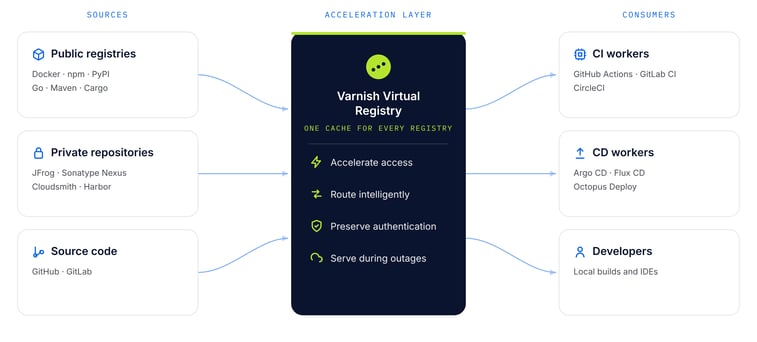
Virtual Registry sits in front of Artifactory as a reverse caching proxy. Clients such as npm install, pip, go get, docker pull and helm install fetch from Virtual Registry instead of Artifactory. If the artifact is already cached, Virtual Registry serves it immediately. If not, it fetches it from Artifactory once and caches it for the next request.
It handles each artifact type natively. It detects the package type from the client request and URL, and applies caching rules suited to that type automatically:
- Packages (a specific version of a package, or an image layer) don’t change, so they’re cached long term and served without contacting Artifactory.
- Manifests that can change, such as npm package metadata or a PyPI index, are revalidated with Artifactory on every request by default, so clients always see new releases. When nothing has changed, Artifactory answers with a lightweight “not modified” response and the cached copy is refreshed in place, without downloading it again.
- Access control follows Artifactory’s own permissions. Before serving an artifact from cache, Virtual Registry checks with Artifactory that the user is allowed to fetch it. Users who pass the same check share one cached copy, so cached content never reaches anyone Artifactory would refuse.
In Varnish’s own tests, adding Virtual Registry in front of Artifactory showed a 17x performance improvement. (See a video breakdown of how Virtual Registry improves Artifactory performance.)
Setup needs a single config.yaml file that points Virtual Registry at your Artifactory URL. You can deploy it as a Docker image, with a Helm chart, or from DEB and RPM packages.
You can also place instances close to where artifacts are used: in the same Kubernetes cluster as your CI runners, next to a central CI/CD pipeline, or on a developer’s machine. This cuts network latency and can reduce egress charges as well as Artifactory load.
What does a virtual registry not do?
- It doesn’t replace Artifactory. Artifactory remains your system of record. Virtual Registry serves copies of what Artifactory has already provided.
- It doesn’t remove every request. Changing manifests are checked with Artifactory on every request by default, although these checks are lightweight. You can set a fixed cache window for manifests if your teams can accept a short delay before new versions appear.
How do you keep cached artifacts up to date?
Freshness is handled by the per-type rules above, so most teams don’t need to manage it. When you need to remove something immediately, for example a package that has been pulled or republished, you can purge it from the cache through Virtual Registry’s purge endpoint.
FAQ
Does Virtual Registry replace Artifactory?
No. It sits in front of Artifactory as a cache. Artifactory remains the source of truth.
Will developers get stale packages?
Not by default. Package metadata is revalidated with Artifactory on every request, so new versions appear immediately. Specific package versions don’t change, so they’re safe to cache long term.
Does Virtual Registry work with JFrog’s cloud service as well as self-hosted Artifactory?
Yes. The recommended pattern is to deploy Virtual Registry close to Artifactory, whether it’s self-hosted or running in the cloud.
Which package types does it support?
These include npm, PyPI, Go modules, Docker/OCI images and Helm charts. See the full list of package types.
Next steps
Follow the step-by-step guide to offloading traffic from JFrog Artifactory, or see how Varnish Virtual Registry fits into your software delivery and CI/CD pipeline. To cut registry infrastructure costs, see artifact and registry cost optimization, or talk to an expert.